
Protoboard Designer
Free Online PCB Layout Editor for Makers & Hobbyists
Protoboard Designer is a free online PCB editor for Android and the web — design circuit boards on your phone, tablet, or in your browser, with no install or EDA experience needed. Place components, route copper traces, and export Gerber files for fabrication or a PDF mask for home etching. Free to start.
"Where ideas become circuits."
Free to start · No credit card required · No EDA experience needed
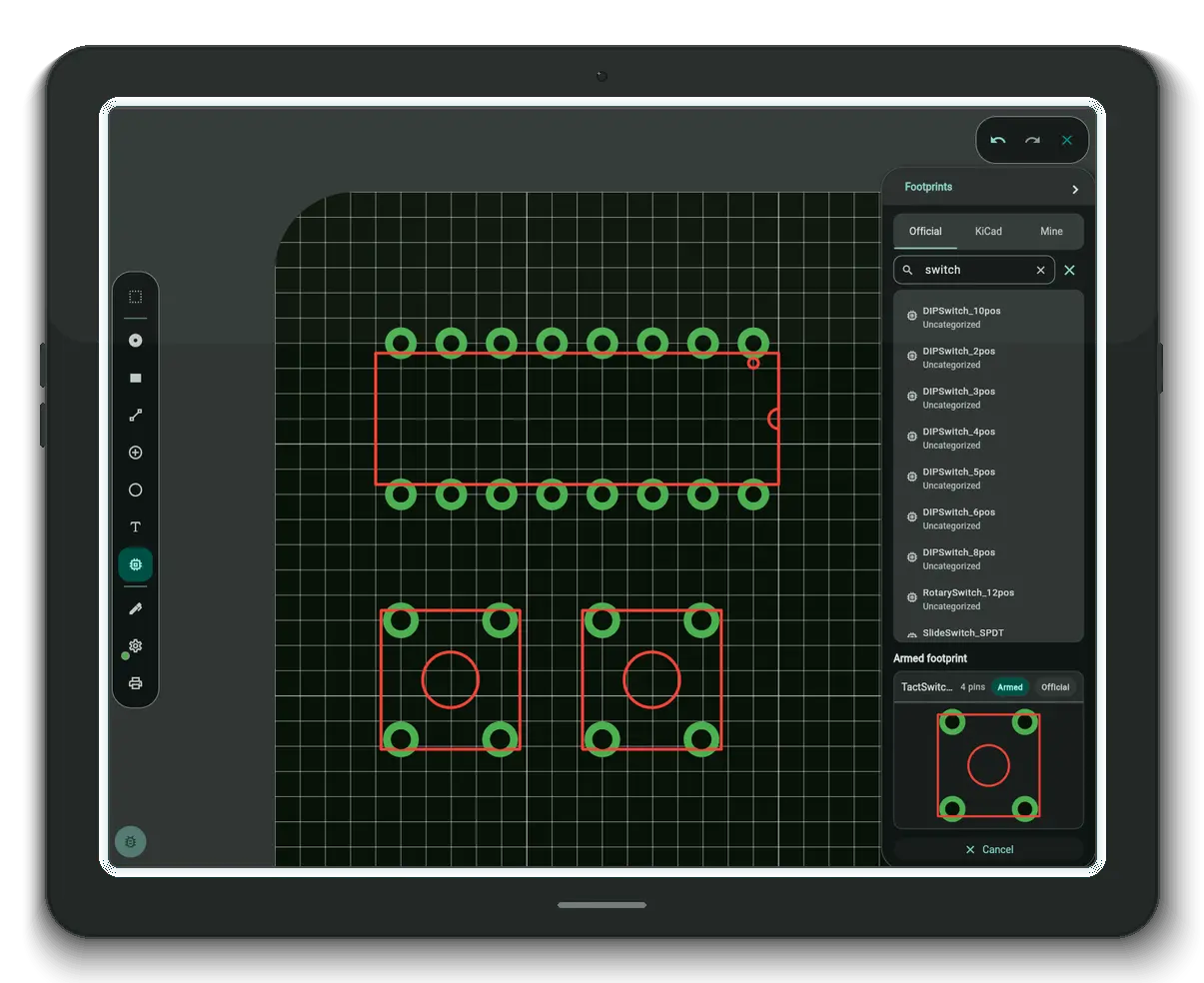
Everything a prototype needs. Nothing it doesn't.
WYSIWYG Layout Editor
See exactly what you'll get. Place footprints, route copper traces, and arrange your board visually — what you see on screen is what gets fabricated. No netlist required.
Cloud Project Sync
Your projects are backed up and synced across your devices — like Dropbox for your PCBs. Pick up on your phone where you left off on the web, always with the latest version.
Gerber & PDF Export
Export Gerber files to send straight to a PCB fab, or generate a PDF to etch your own board at home. Either way, you're one tap away from something physical.
Rich Footprint Library
Start with a built-in component library, import footprints from KiCad, or add any public GitHub repository as a footprint source. Your parts, your workflow.
Design Rule Check
Catch shorts, clearance violations, and unconnected copper before you order. DRC runs right in the editor and points at every problem on the board.
Ground Pours & AutoGround
Fill copper areas with a tap. AutoGround pours the ground plane around your traces and keeps it up to date as your layout changes.
Bring your projects with you.
Sprint Layout
Open .lay6 files as full projects — boards, traces, pads and all — and import .lmk macros into your library. Design on from where Sprint Layout left off, now on Android and the web. How to import .lay6 files →
KiCad
Pull .kicad_mod footprints and whole KiCad libraries into your workspace — from local files or straight from GitHub repositories. Your KiCad part collection carries over. How to import KiCad footprints →
Eagle
Open your .brd board files as full projects — the layout you built in Eagle comes across so you can keep working on it here, on Android or the web. How to import .brd files →
Opening Sprint Layout and Eagle files as new projects is free on every plan — only the cloud-board limit applies. Importing footprints and macros into your reusable library starts with the Maker plan.
From idea to board in three steps.
Place components
Search the built-in footprint library, import from KiCad, or pull footprints from any public GitHub repo — then drag parts straight onto the board.
Route your traces
Draw copper pad-to-pad, pour ground planes with AutoGround, and let the Design Rule Check flag shorts and clearance issues as you go.
Export & build
Export Gerber files any PCB fab accepts, or a mirrored PDF mask to etch the board at home. Your design becomes a real board.
New to PCB design? Read the step-by-step guide to your first board →
Not another heavy EDA suite — a KiCad alternative built for simplicity
Unlike KiCad, Eagle, Fritzing, or Altium — Protoboard Designer is designed to get you from idea to board in minutes, not days.
"The GOAT of Android PCB designers."
"Surprisingly flexible and intuitive… AutoGround is really well done."
Free to start. Upgrade when you outgrow it.
Subscriptions are billed through Google Play and sync automatically to the web app. Prices shown in USD — your local price and any current offer appear at checkout.
Free
$0 forever
Everything you need for your first boards
- Full layout editor & Design Rule Check
- 3 cloud-synced boards
- 5 custom macros
- PDF export (with watermark)
- Built-in footprint library
- Open Sprint Layout, KiCad & Eagle files
Maker
$5.99 / month
For hobbyists building their own boards
- Everything in Free
- Up to 20 cloud boards
- Unlimited custom macros
- Full PDF export — mirroring & mosaic printing for home etching
- KiCad footprint import
- Sprint Layout macros
Engineer
$10.99 / month
For professionals and power users
- Everything in Maker
- Unlimited boards
- Gerber export — send straight to any fab
- Thermal pads
- Watermark-free exports by default
Frequently asked questions
Is Protoboard Designer free?
Yes. The free plan includes the full layout editor, Design Rule Check, 3 cloud-synced boards, 5 custom macros, PDF export, and free import of Sprint Layout and Eagle projects — no credit card required. Optional Maker and Engineer plans unlock more boards, footprint-library import, full PDF printing options, and Gerber export.
Is Protoboard Designer an online PCB editor?
Yes. Protoboard Designer runs entirely in your browser as a WebAssembly web app — there's nothing to install. It's a full online PCB editor: design boards, route copper, run a Design Rule Check, and export Gerber or PDF files. The same editor is also available as an Android app, and your projects sync between them.
Do I need EDA or PCB design experience?
No. Protoboard Designer is a WYSIWYG editor: you place footprints and draw copper traces directly on the board — no schematic or netlist required. What you see on screen is what gets fabricated.
Can I import KiCad footprints?
Yes. You can import footprints from KiCad libraries and add any public GitHub repository as a footprint source. KiCad footprint import is part of the Maker plan.
Can I open my existing Sprint Layout, KiCad, or Eagle designs?
Sprint Layout .lay6 and Eagle .brd files open as new projects — traces and pads included — free on every plan; the only limit for free users is the number of cloud boards. From KiCad you can import footprints and whole libraries (.kicad_mod, including straight from GitHub) starting with the Maker plan, along with Sprint Layout .lmk macros.
Can I order my board from JLCPCB, PCBWay, or another fab?
Yes. Protoboard Designer exports industry-standard Gerber files (Engineer plan) that any PCB manufacturer — JLCPCB, PCBWay, OSH Park, Aisler, and others — accepts directly.
Can I etch a PCB at home with it?
Yes. Export your layout as a PDF mask — with mirroring for toner transfer or photoresist — print it at 1:1 scale, and etch the board at home.
Does it work on my phone or tablet?
Yes. The full editor runs on Android phones and tablets via the Google Play app, and in any modern desktop browser as a WebAssembly web app. Projects sync between devices automatically.
Is there an iOS app?
Not yet — iOS is on the roadmap. In the meantime you can use the web app in Safari or any browser on iPhone and iPad.
How is it different from KiCad or Fritzing?
KiCad is a full schematic-driven EDA suite — powerful, but with a steep learning curve. Fritzing focuses on breadboard diagrams. Protoboard Designer sits in between: a direct, visual PCB layout editor that gets you from idea to a fabricatable board in minutes, on the web or on Android. For complex multi-sheet schematic projects, a full EDA suite is still the right tool.
Your next circuit starts here.
Sign in with Google — no credit card required. Use the web app in your browser, or install the Android app from Google Play. Start laying out your board in seconds.